High-Demand Roles
Power Platform Developer, Power Apps Specialist, Business Process Automation Analyst, Low-Code Solutions Architect.
The Microsoft Power Platform is redefining enterprise development by enabling rapid application creation and process automation. This course goes beyond basic form building, covering advanced Dataverse data modeling, complex Power Automate flows, and seamless integration with Power BI and SharePoint.

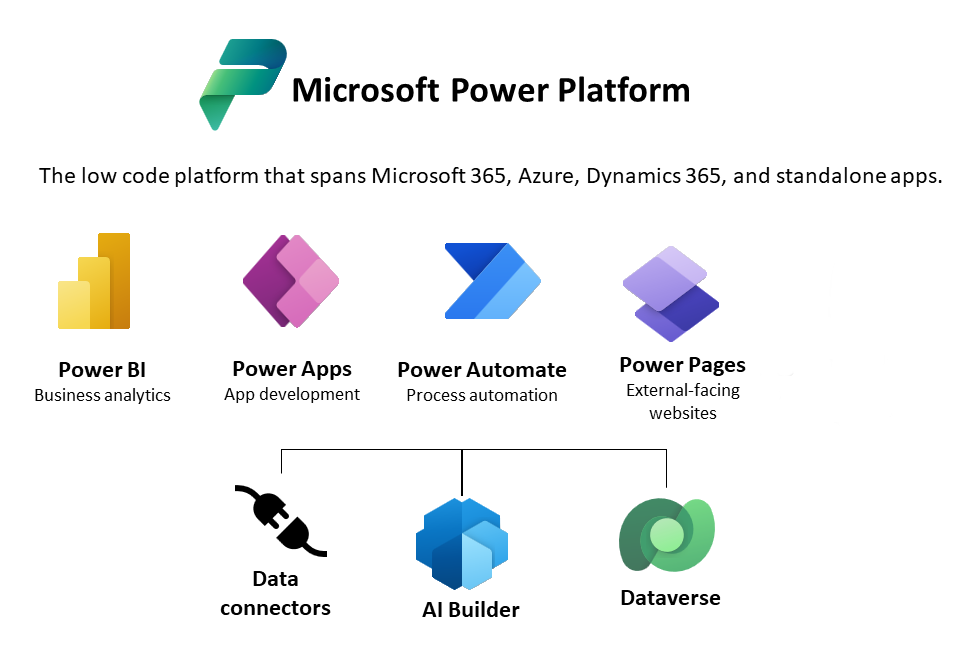
Power Platform Ecosystem: Overview of Power Apps, Power Automate, Power BI, and Power Pages.
Licensing and Environments: Understanding various licenses and setting up development environments.
Dataverse Fundamentals: Tables, Columns, Relationships, and Business Rules.
Security Model: Roles, Permissions, and Data Access Control in Dataverse.
Design Fundamentals: Building apps from blank canvas, templates, and data sources.
Power Fx Language: Mastering formulas, functions (Patch, Collect, Filter, LookUp).
Controls and Components: Working with Galleries, Forms, input controls, and reusable components.
Data Connections: Connecting to SharePoint, SQL, Excel, and Dataverse tables.
User Interface (UI) & Navigation: Screen design, responsive layouts, and navigation logic.
Model-Driven Architecture: Understanding the difference between Canvas and Model-Driven apps.
Site Map Configuration: Defining the navigation and structure of the application.
Form Design and Customization: Working with forms, views, charts, and dashboards.
Business Process Flows (BPF): Designing guided processes across the application.
Client-Side Scripting (Basic): Introduction to JavaScript for advanced form behaviors (Optional/Advanced Module).
Flow Types: Creating Cloud Flows (Automated, Instant, Scheduled) and Desktop Flows (RPA).
Triggers and Actions: Using connectors for Office 365, SharePoint, Teams, and custom APIs.
Data Manipulation: Working with conditions, loops, apply to each, and variables.
Approvals and Notifications: Setting up automated approval workflows and alerts.
Error Handling: Implementing logic to manage flow failures and exceptions.
SharePoint Integration: Using Power Apps forms to customize SharePoint lists.
Teams Integration: Embedding Power Apps and Power Automate within Microsoft Teams.
Power BI Integration: Displaying Power BI reports directly within Power Apps.
API/Custom Connector Usage: Connecting Power Platform to external services and systems.
Requirement Gathering & Planning: Defining scope, user stories, and data schema.
Solution Development: Building the app (Canvas/Model-Driven) and all necessary flows.
Testing and Validation: Unit testing, UAT, and bug fixing.
Deployment & Governance: Publishing the application and managing environments.
Presentation & Portfolio: Preparing the project for demonstration in job interviews.




This comprehensive program covers Power Apps (Canvas and Model-Driven), Power Automate (Flow), Dataverse (the underlying data platform), and essential integration with Power BI and SharePoint.
No. Power Apps is a low-code platform. While a basic understanding of logic is helpful, the course starts from the fundamentals and is designed for individuals with zero prior coding experience.
This course focuses on rapid application development and automation using visual interfaces and pre-built connectors, drastically reducing the time and complexity required, compared to traditional full-stack coding.
Yes, we offer 100% Job Placement Assistance for all certified students. Our placements target roles like Power Platform Developer and Low-Code Specialist in major MNCs and IT firms.
We offer flexible Online sessions for remote learners and Classroom/Offline training at our four Hyderabad branches: Ameerpet, SR Nagar, KPHB, and Madhapur.
Absolutely. The curriculum is heavily project-based, culminating in a Capstone Project where you build a fully functional, enterprise-level application using simulated or sanitized real-world scenarios.